

Skip to content

DBS Checks & Management

Stop manually chasing DBS checks.

Manage DBS checks as part of one connected safer-recruitment and onboarding journey.

01The problem

For many organisations, obtaining a DBS check isn’t the difficult part.

Managing the process is.

  • Which candidates need action?
  • Who already has a DBS certificate?
  • Is the candidate subscribed to the DBS Update Service?
  • Does the role meet the eligibility requirements for the proposed check?
  • Has the candidate completed their actions?
  • Has the application been submitted?
  • What’s outstanding?
  • Has the result been received?
  • Does anything require review?
  • And can you demonstrate what happened afterwards?

YourClouds helps manage the DBS workflow from candidate onboarding through to completion.

One candidate. One workflow. One recruitment record.

DBS eligibility and the appropriate level and type of check depend on the role, activities undertaken and applicable requirements. DBS application fees and other applicable third-party charges are additional to the YourClouds managed onboarding fee.

DBS Shouldn’t Be a Separate Recruitment Process

A candidate gets through interview.

You decide to progress them.

Then the recruitment journey suddenly fragments.

  • Their application is in one system.
  • Their references are somewhere else.
  • Employment-gap information is in an email.
  • Their DBS is being processed separately.
  • Right to Work is another workflow.
  • Their contract is waiting for signature.

And your recruitment team is trying to remember what’s outstanding.

YourClouds brings those processes together.

From Candidate Selection to DBS Completion

A configured DBS workflow could look like:

  1. 01Candidate Selected
  2. 02Managed Onboarding Starts
  3. 03Role / DBS Workflow Identified
  4. 04Existing DBS Information Captured
  5. 05Update Service RouteorNew Application
  6. 06Candidate Actions Completed
  7. 07DBS Process Progresses
  8. 08Status Recorded
  9. 09Exception / Review if Required
  10. 10Onboarding Continues

The DBS process becomes part of the candidate’s wider recruitment record rather than an isolated administrative task.

DBS Management + Safer Recruitment

YourClouds connects DBS workflows with the rest of recruitment.

  1. Application
  2. Interview
  3. Candidate Selected
  4. Employment History
  5. Employment Gap Checks
  6. References
  7. Telephone Verification
  8. DBS
  9. Right to Work
  10. Contract
  11. Onboarding
  12. HR – Coming Soon

Instead of asking your recruitment team to manage each process separately, YourClouds provides a connected workflow.

02How it works

  1. 1

    Candidate Enters Onboarding

    Once your organisation decides to progress a candidate into onboarding, the appropriate pre-employment workflows can begin.

    Candidate information already collected during recruitment can remain connected to their onboarding journey.

    There’s no need to treat the DBS process as the beginning of an entirely new candidate record.

  2. 2

    Determine the Appropriate DBS Workflow

    Different roles may require different recruitment processes.

    YourClouds can configure DBS workflows around:

    • Organisation
    • Sector
    • Role
    • Service
    • Location
    • Recruitment process

    This is important because DBS eligibility isn’t simply determined by an employer deciding that it would like a particular level of check.

    Eligibility and the appropriate level and type of check depend on the position and the activities undertaken.

    YourClouds supports the workflow.

    Your organisation remains responsible for ensuring the appropriate checks are requested for the role.

  3. 3

    Does the Candidate Already Have a DBS Certificate?

    Where appropriate to your process, candidates can provide information about an existing DBS certificate.

    This can include relevant certificate details and whether the candidate indicates that they are subscribed to the DBS Update Service.

    The workflow can then determine the appropriate next action.

  4. 4

    DBS Update Service Workflow

    Where the candidate has an existing certificate and use of the DBS Update Service is appropriate, the recruitment workflow can follow that route.

    For example:

    1. Existing DBS Declared→
    2. Update Service Status / Information Required→
    3. Candidate Information Collected→
    4. Appropriate Update Service Process→
    5. Outcome Recorded→
    6. Review if Required

    This can prevent candidates unnecessarily being pushed through the same workflow regardless of their circumstances.

  5. 5

    New DBS Application

    Where a new DBS application is required, YourClouds can facilitate the application process through the configured workflow.

    Candidates can be guided through the actions required from them.

    The recruitment team can see the DBS status alongside the rest of the candidate’s onboarding progress.

    DBS application fees and applicable third-party charges are additional.

  6. 6

    Candidate Completes Their Actions

    Candidates can use the YourRole app or desktop candidate portal to manage their recruitment and onboarding actions.

    Instead of relying entirely on email, candidates can see what they need to do.

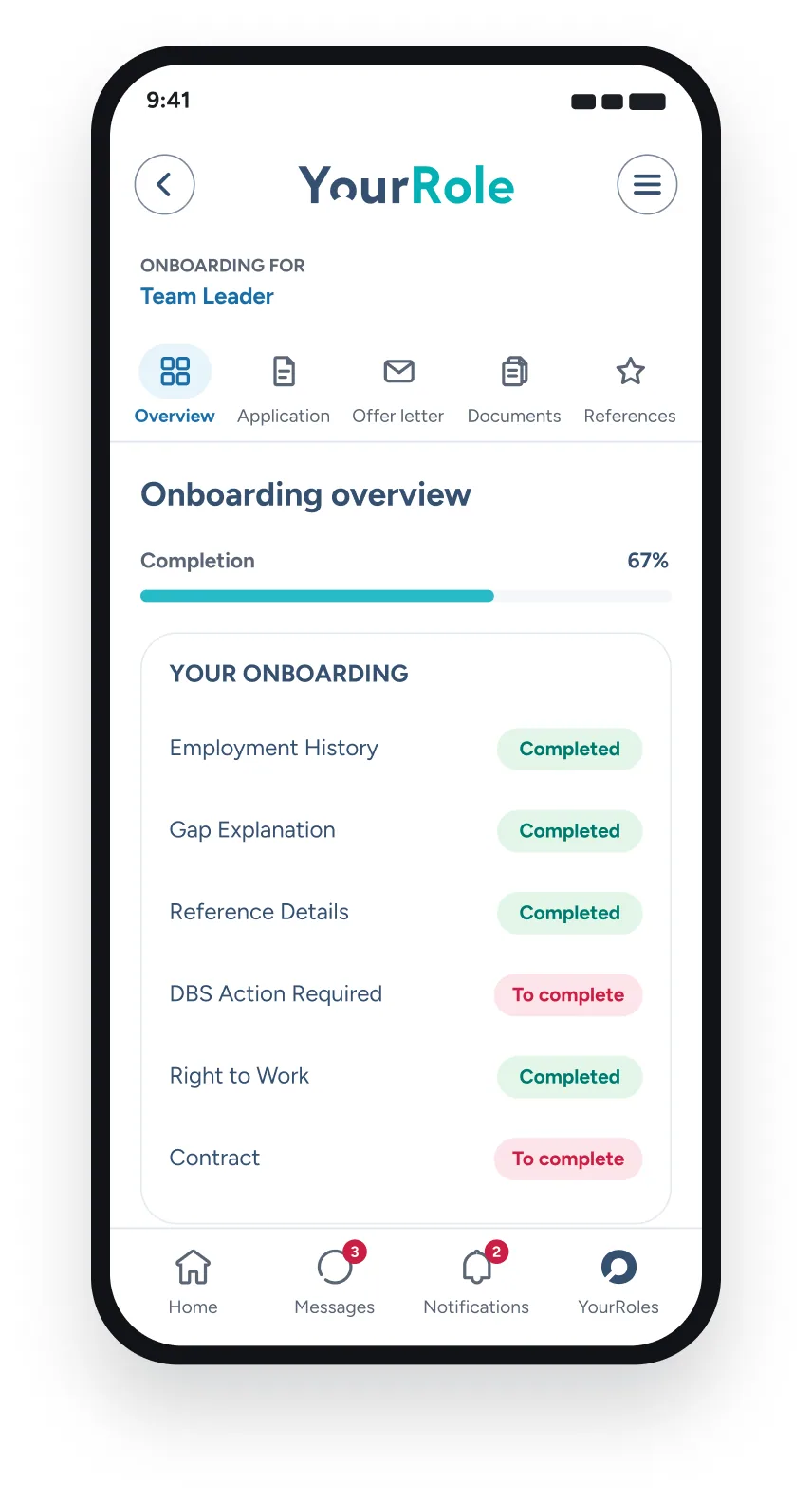
    For example:

    YourRole app onboarding overview at 67% complete, with the DBS action and contract still to complete

    The DBS process becomes part of the same candidate experience.

  7. 7

    Automatically Monitor What’s Outstanding

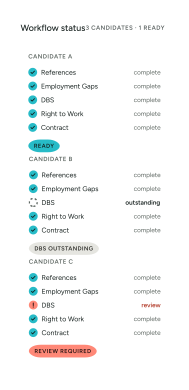
    Your recruitment team shouldn’t have to open every candidate record every morning to find out what hasn’t been completed.

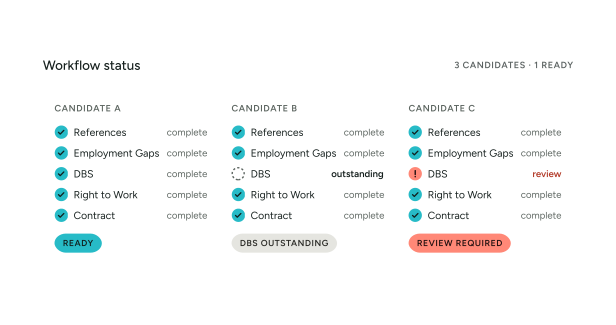
    YourClouds can monitor workflow status.

    For example:

    Your recruitment team can concentrate on the exceptions.

  8. 8

    Chase Outstanding Candidate Actions

    A candidate hasn’t completed their required DBS action.

    A traditional system may simply display:

    Candidate Records

    • File
    • Edit
    • View
    • Records
    • Reports
    • Help
    NameRef No.StatusUpdated
    Jordan Hughes00418DBS — Outstanding12/03
    Records 1–4 of 4Refresh

    Your recruitment team then has to do something.

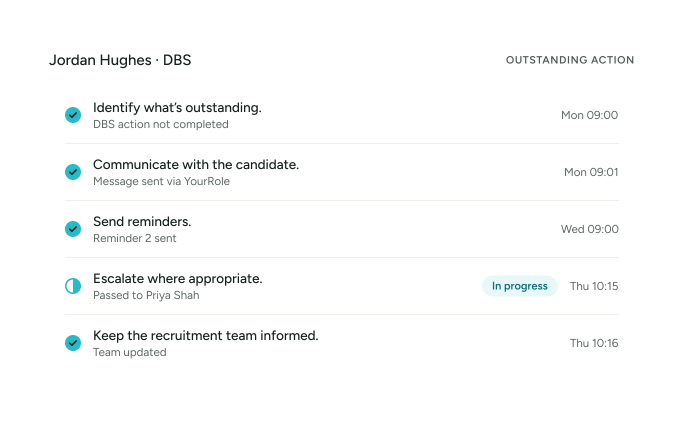
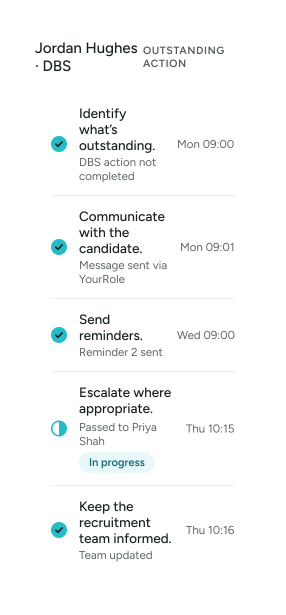
    YourClouds is designed around a different principle.

    Instead of simply recording the problem, the workflow helps progress it.

YourRole

Candidate Notifications Through YourRole

Candidates can receive notifications through their recruitment journey.

For example:

ACTION REQUIRED

Complete your DBS onboarding step

or:

REMINDER

Your DBS action is still outstanding

or:

UPDATE

Your DBS stage has progressed

Candidates can access their onboarding journey through the YourRole app or desktop portal.

Two YourRole app screens: DBS application stages and the candidate’s tasks and notifications

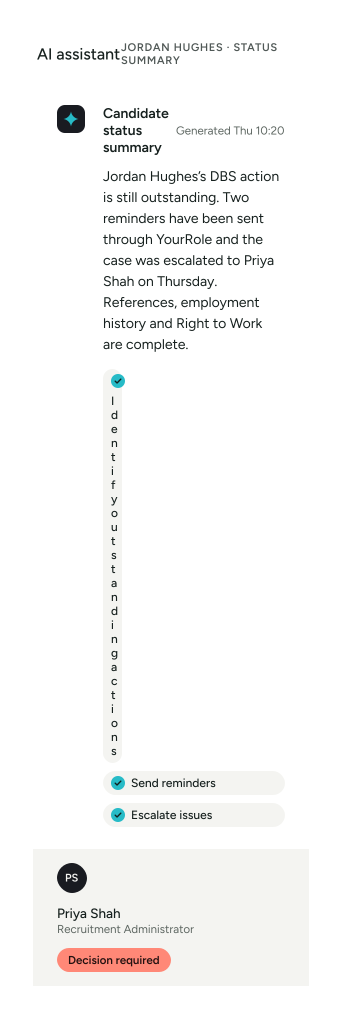
AI-Assisted Onboarding

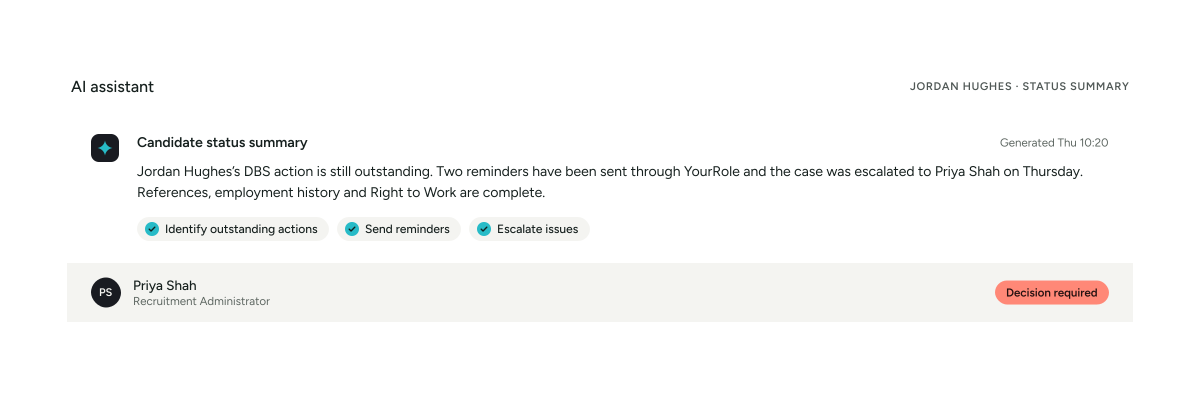
AI can help manage repetitive administration around the onboarding process.

Depending on the configured workflow, this can include helping to:

  • Identify outstanding actions
  • Communicate with candidates
  • Answer appropriate process questions
  • Send reminders
  • Monitor progress
  • Identify exceptions
  • Escalate issues
  • Summarise candidate status

The objective isn’t to allow AI to make suitability decisions.

AI helps manage the process.

Your organisation makes the recruitment decision.

Don’t Make Your Recruitment Team Become DBS Administrators

Think about the administrative process.

  • Candidate selected.
  • Email candidate.
  • Candidate doesn’t respond.
  • Send another email.
  • Candidate says they already have a DBS.
  • Ask whether they’re on the Update Service.
  • Get the information.
  • Determine the next workflow.
  • Candidate needs a new application.
  • Send instructions.
  • Wait.
  • Chase again.
  • Check status.
  • Update spreadsheet.
  • Update ATS.
  • Tell hiring manager.

Repeat for every candidate.

YourClouds is designed to reduce that repetitive administration.

03In YourClouds

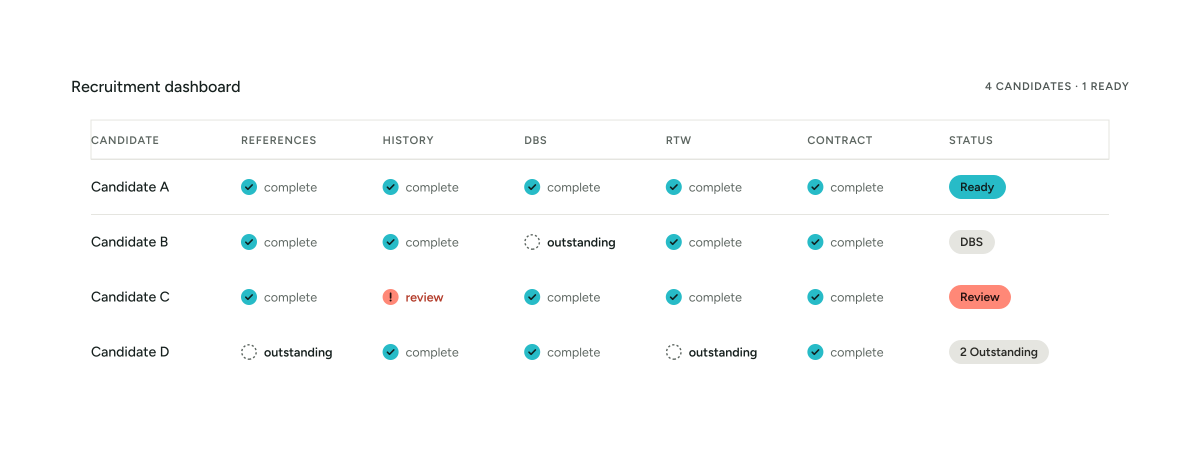
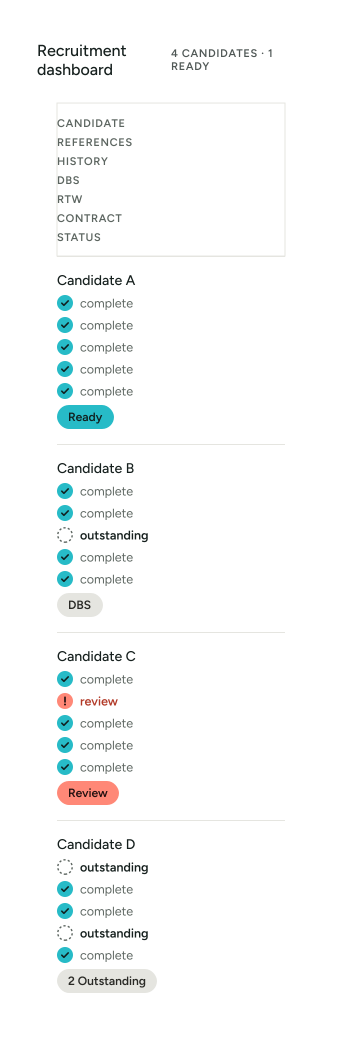
One Recruitment Dashboard

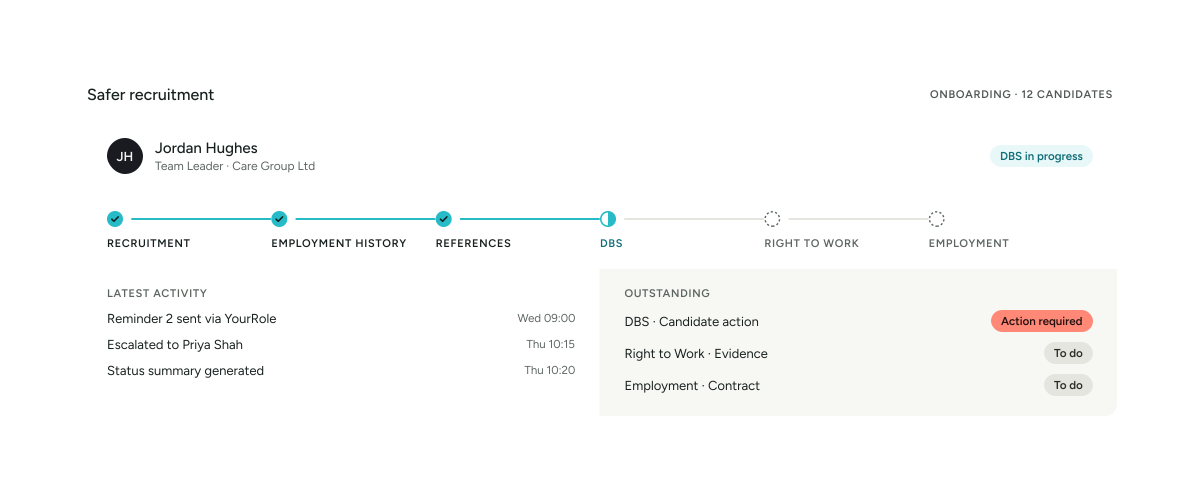
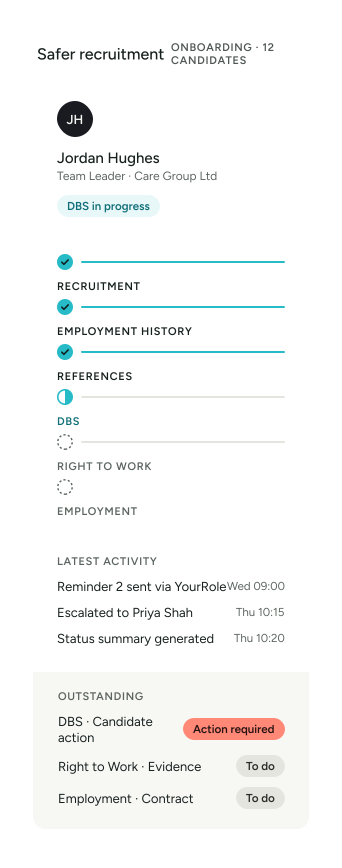
Your recruitment team can see DBS alongside the other onboarding stages.

For example:

The question becomes:

“What needs attention?”

rather than:

“Where are we up to with this candidate?”

DBS Checks by Sector

Kitchen and dining area in a children’s home

DBS Checks for Children’s Homes

DBS workflows can form an important part of recruitment into children’s residential services where the role is eligible for the relevant check.

YourClouds can connect DBS management with:

  • Employment history
  • Employment gaps
  • References
  • Telephone verification
  • Candidate onboarding
  • Right to Work
  • Contracts
  • Recruitment records

This helps children’s home providers maintain a clearer recruitment journey.

Explore Safer Recruitment for Children’s Homes


Lounge with armchairs in a care home

DBS Checks for Adult Social Care

Care organisations often recruit continuously and across large workforces.

YourClouds can help manage DBS workflows across services including:

  • Care homes
  • Nursing homes
  • Domiciliary care
  • Supported living
  • Learning disability services
  • Mental health services
  • Community care
  • Other adult social care services

Central recruitment teams can monitor progress across multiple candidates and locations.

Explore Safer Recruitment for Adult Social Care
Primary school classroom with tables and chairs

DBS Checks for Schools & Education

Schools, academy trusts and education providers can incorporate DBS workflows into their wider safer-recruitment processes.

YourClouds can help create consistent recruitment workflows across:

  • Primary schools
  • Secondary schools
  • Multi-Academy Trusts
  • Independent schools
  • SEN/SEND provision
  • Alternative provision
  • Colleges
  • Other education organisations
Explore Safer Recruitment for Schools & Education
Clinical treatment room with an examination couch

DBS Checks for Healthcare

Healthcare organisations can configure DBS workflows around different roles and services where those roles are eligible for the relevant checks.

YourClouds can help central recruitment teams manage candidate progress across multiple departments and locations.

Explore Safer Recruitment for Healthcare

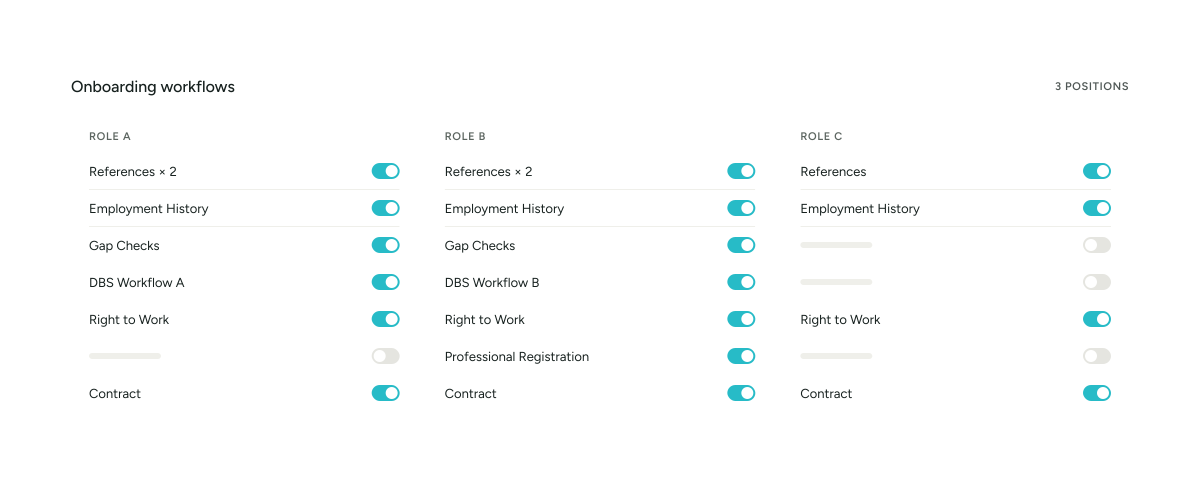
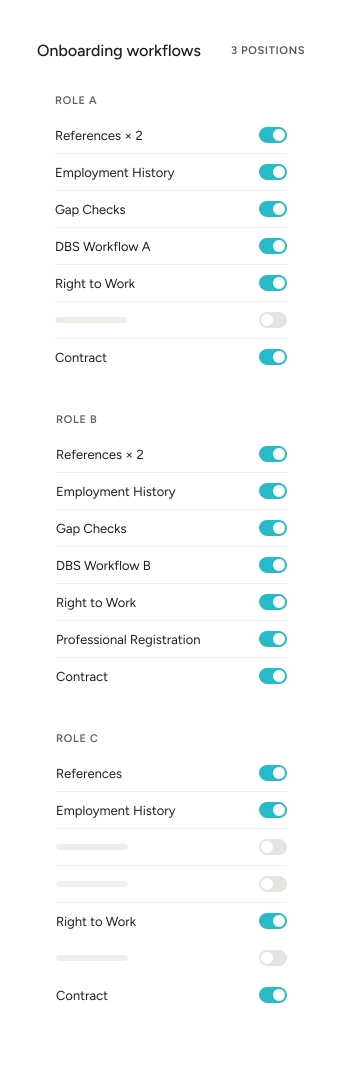
Different Roles. Different Workflows.

Not every employee in an organisation necessarily follows the same DBS process.

YourClouds allows different onboarding workflows to be configured for different positions.

For example:

The workflow can reflect the organisation’s requirements for each role rather than forcing every candidate through an identical process.

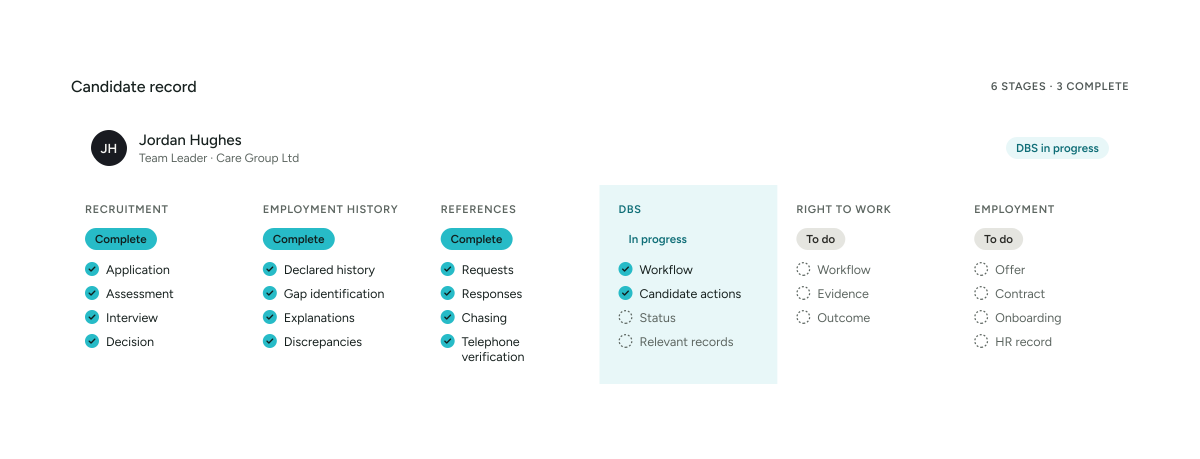
Connect DBS With the Candidate’s Wider Record

The real value isn’t simply recording:

DBS

It’s knowing how that stage relates to the rest of onboarding.

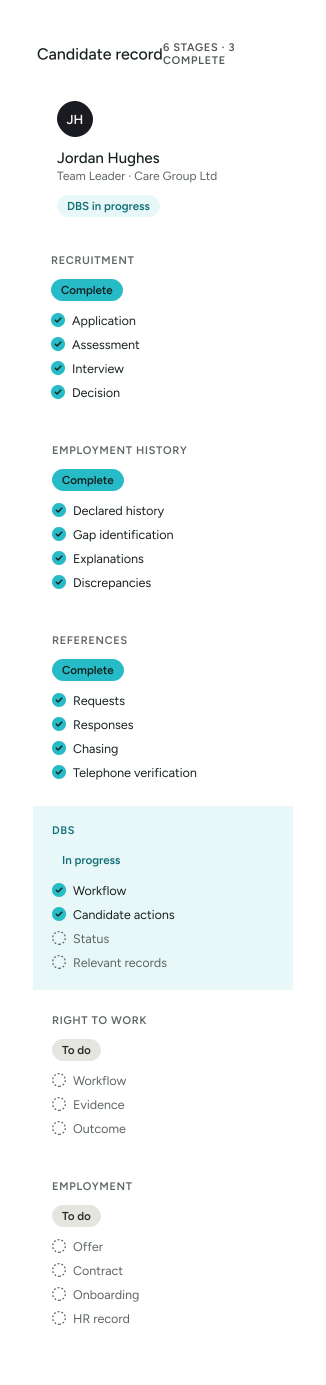
A candidate record can bring together:

One connected journey.

Audit Trail

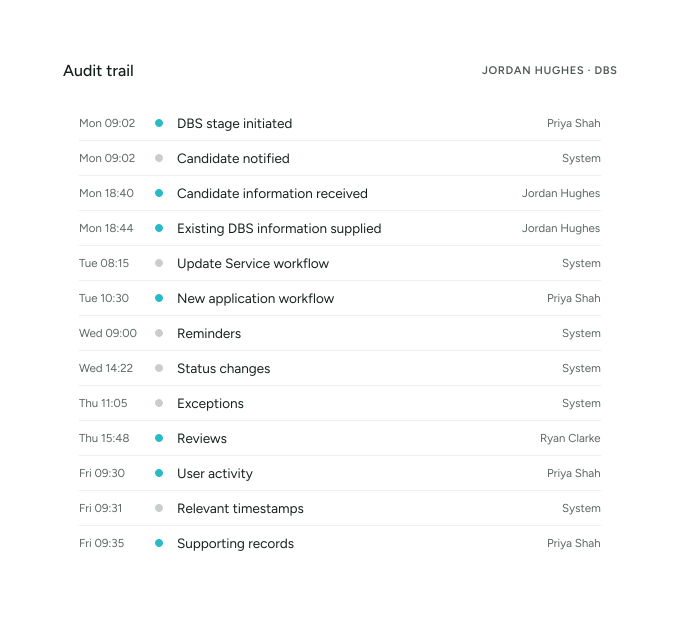
YourClouds can maintain an audit trail of relevant DBS workflow activity.

Depending on the configured process, this can include:

This creates a clearer history of how the candidate moved through the process.

Keep Sensitive Information Controlled

Recruitment and DBS-related information should only be available to appropriate users.

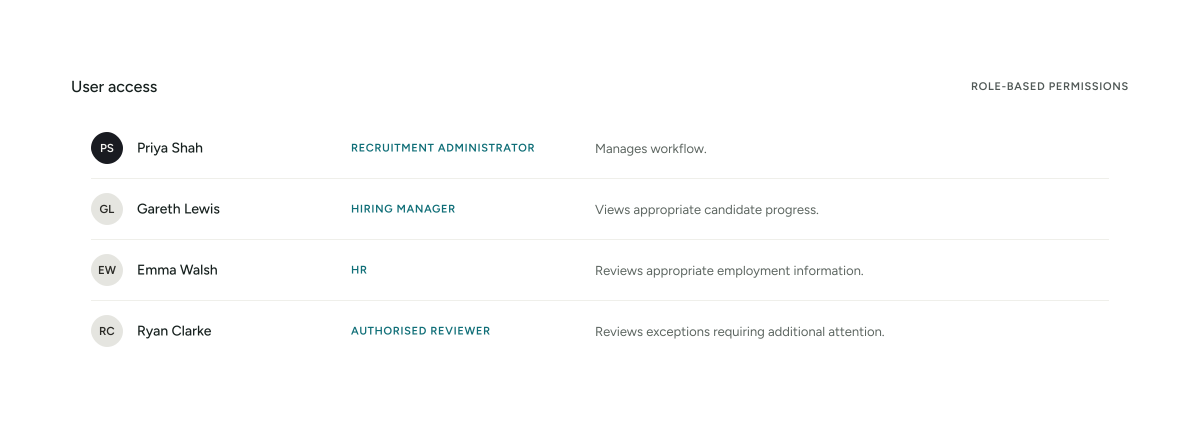
YourClouds can use role-based permissions to control access to recruitment and onboarding information according to the organisation’s configuration.

Different users can be given different levels of visibility and responsibility.

For example:

This helps avoid giving every manager access to every piece of candidate information.

From DBS to Right to Work

A DBS check is only one element of pre-employment onboarding.

A candidate may still have outstanding:

  • References
  • Employment-history information
  • Gap explanations
  • Right to Work
  • Contracts
  • Qualifications
  • Professional registrations
  • Other role-specific requirements

That’s why YourClouds treats DBS as one part of the complete onboarding journey.

04Pricing

Managed Safer Recruitment & Onboarding

Instead of purchasing separate tools for each stage, YourClouds can help manage the complete onboarding journey.

£199 + VAT

per candidate entering onboarding

£199 + VAT isn’t a DBS check. It’s the managed onboarding journey around the candidate — DBS is one part of a much larger process.

The managed service can include:

  • Employment-history checking
  • Employment-gap identification
  • Candidate follow-up
  • Reference requests
  • Automated reference chasing
  • Telephone reference verification
  • AI-assisted discrepancy identification
  • DBS workflow management
  • Right to Work workflow management
  • Offers and contracts
  • Digital signatures
  • Candidate communications
  • Automated reminders
  • AI-assisted administration
  • Exception escalation
  • Structured recruitment records

Additional Charges

DBS application fees, Right to Work verification fees and other applicable third-party charges are additional to the £199 + VAT managed onboarding fee.

What Does Your Current Process Cost?

Consider how much staff time is spent:

  • Checking whether a DBS is required.
  • Determining the appropriate workflow.
  • Contacting candidates.
  • Requesting information.
  • Sending instructions.
  • Chasing candidate actions.
  • Checking progress.
  • Updating managers.
  • Recording outcomes.
  • Managing exceptions.

Then add:

  • Reference chasing.
  • Employment-gap checking.
  • Right to Work.
  • Contracts.
  • Candidate communications.

YourClouds brings those workflows together.

Manage Exceptions Instead of Chasing Candidates

The principle behind YourClouds is simple.

Your recruitment team shouldn’t spend most of its time checking whether routine tasks have been completed.

Technology should help manage those tasks.

Software manages the workflow.

Automation progresses routine actions.

AI assists with administration.

Exceptions are surfaced.

People make the decisions that require judgement.

Why Use YourClouds for DBS Management?

  • Connected Recruitment

    DBS becomes part of the candidate’s wider recruitment and onboarding journey.

  • Configurable Workflows

    Different roles can follow different DBS processes.

  • Update Service Workflow

    Support appropriate workflows where candidates have an existing DBS and use of the Update Service is applicable.

  • New DBS Applications

    Facilitate new applications where required.

  • Candidate App

    Candidates can manage actions through YourRole.

  • Automated Reminders

    Help progress outstanding candidate actions.

  • AI-Assisted Administration

    Reduce repetitive recruitment work.

  • Exception Management

    Direct your recruitment team towards cases requiring attention.

  • Multi-Site Oversight

    Monitor onboarding across multiple locations and services.

  • Audit Trail

    Maintain a clearer record of workflow activity.

  • Wider Safer Recruitment

    Connect DBS with references, employment histories, gap checking, Right to Work, contracts and HR.

05Questions

Frequently Asked Questions

What is a DBS check?

A Disclosure and Barring Service check can provide criminal-record and, depending on the eligible level and type of check, other relevant information to help organisations make appropriate recruitment decisions.

Eligibility and the information available depend on the role and applicable legal requirements.

Does every employee need a DBS check?

No.

Whether a DBS check is appropriate, and the level and type of check an organisation can request, depend on the role and activities undertaken.

Organisations should ensure that the check requested is appropriate and legally permitted for the position.

Can YourClouds manage DBS checks?

Yes.

DBS workflows can be incorporated into the YourClouds recruitment and onboarding process.

Can YourClouds facilitate new DBS applications?

Where a new DBS application is required, YourClouds can facilitate the application process through the configured onboarding workflow.

Applicable DBS and third-party fees are additional.

Can YourClouds support the DBS Update Service?

Where appropriate, the recruitment workflow can incorporate the relevant DBS Update Service process for candidates who have an existing certificate and subscription.

Does having a DBS Update Service subscription automatically mean a new check isn’t required?

Not necessarily.

The organisation needs to ensure that use of an existing certificate and the Update Service is appropriate for the role and circumstances.

Does YourClouds decide what level of DBS check a candidate needs?

YourClouds can configure workflows around roles and organisational requirements, but the recruiting organisation remains responsible for ensuring that any DBS check requested is appropriate and legally permitted for the role.

Can candidates manage DBS actions through the YourRole app?

Yes.

Candidates can use YourRole or the desktop candidate portal to manage recruitment and onboarding actions.

Can YourClouds remind candidates about outstanding DBS actions?

Yes.

Configured workflows can identify outstanding candidate actions and send reminders or escalate them where appropriate.

Can managers see DBS progress?

Authorised users can be given appropriate visibility of candidate onboarding status according to their permissions.

Does YourClouds store the DBS certificate?

The precise information retained should follow your configured process and applicable data-protection and DBS handling requirements.

YourClouds can maintain the appropriate recruitment record and workflow evidence without assuming that all certificate information should be retained indefinitely.

Can DBS workflows differ by role?

Yes.

Different roles can follow different onboarding and DBS workflows.

Can DBS be combined with reference checking?

Yes.

DBS can form part of the same onboarding journey as reference requests, chasing and telephone verification.

Can DBS be combined with employment-gap checking?

Yes.

Employment-history and gap checking can be completed alongside other onboarding stages.

Is DBS included within the £199 + VAT managed onboarding service?

Management of the DBS workflow can form part of the £199 + VAT managed onboarding service.

The actual DBS application fee and applicable third-party charges are additional.

When does the £199 + VAT fee become payable?

The £199 + VAT managed onboarding fee becomes payable when your organisation chooses to progress the candidate into managed onboarding.

It isn’t dependent on the candidate subsequently starting employment.

Stop Managing DBS in Isolation.

Connect it to the entire recruitment journey.

  • References
  • Employment History
  • Gap Checks
  • Telephone Verification
  • DBS
  • Right to Work
  • Contracts
  • Onboarding

£199 + VAT per candidate entering managed onboarding

DBS eligibility, level and type of check depend on the role, activities undertaken and applicable legislation and guidance. YourClouds supports the workflow but does not replace the recruiting organisation’s responsibility for determining appropriate recruitment checks or making recruitment decisions. DBS application fees and other applicable third-party charges are additional.