

Skip to content

Managed Candidate Onboarding

You choose the candidate. We help get the onboarding done.

Software + AI + Managed Recruitment Support £199 + VAT per candidate entering onboarding

You’ve interviewed the candidate. You’ve decided you want them. Now the work begins.

References. Employment history. Employment gaps. Telephone verification. DBS. Right to Work. Offer letters. Contracts. Candidate questions. Reminders. Chasing. Checking. Recording. Reviewing. Updating managers.

YourClouds helps manage it.

Our managed candidate onboarding service combines the YourClouds recruitment platform, AI automation and managed recruitment support to help progress candidates from selection through pre-employment onboarding.

Don’t just buy recruitment software.

Get help doing the recruitment work.

£199 + VAT per candidate entering managed onboarding.

DBS application fees, Right to Work verification fees and other applicable third-party charges are additional.

01The service

What Do You Get for £199 + VAT?

Once you decide to progress a candidate into managed onboarding, YourClouds can help manage:

  • Employment-history checking
  • Employment-gap identification
  • Candidate gap explanations
  • Reference requests
  • Automated reference chasing
  • Telephone reference verification
  • AI-powered telephone verification
  • Human escalation where appropriate
  • Reference/application comparison
  • Discrepancy identification
  • DBS workflow management
  • Right to Work workflow management
  • Candidate communications
  • Automated reminders
  • Offer-letter management
  • Contract management
  • Digital signatures
  • Outstanding-action monitoring
  • Exception escalation
  • Recruitment audit trail
  • Candidate onboarding record
  • Transfer into YourClouds HR – Coming Soon

£199 + VATper candidate entering onboarding

You make the recruitment decisions.

YourClouds helps do the work around them.

Recruitment Software Usually Gives You More Work to Do

Most recruitment systems are designed to record what your recruitment team has done.

They tell you:

Candidate Records

  • File
  • Edit
  • View
  • Records
  • Help
  • Reference — Outstanding
  • DBS — Outstanding
  • Right to Work — Outstanding
  • Contract — Outstanding

That’s useful.

But somebody still has to do something.

Someone needs to send the email. Someone needs to chase the referee. Someone needs to contact the candidate. Someone needs to identify the employment gap. Someone needs to compare the dates. Someone needs to progress the DBS workflow. Someone needs to obtain the Right to Work information. Someone needs to chase the contract.

YourClouds is designed around a different model.

Don’t just record outstanding work. Help get the work completed.

02How it works

From Candidate Selection to Onboarding

The managed onboarding journey can look like this:

  1. Candidate Selected
  2. MANAGED ONBOARDING STARTS
  3. Conditional Offer
  4. Employment History Reviewed
  5. Gaps Identified
  6. References Requested
  7. References Chased
  8. Telephone Verification
  9. DBS Workflow
  10. Right to Work Workflow
  11. Contract
  12. Outstanding Actions Resolved
  13. ONBOARDING COMPLETE
  14. HR – Coming Soon

One connected candidate journey.

  1. 1

    You Choose the Candidate

    Your organisation remains in control of recruitment.

    You decide:

    Who progresses. Who receives an offer. Whether information is satisfactory. Whether exceptions are acceptable. Whether the candidate is appointed.

    YourClouds doesn’t replace recruitment judgement.

    It helps remove the repetitive administration surrounding it.

  2. 2

    Managed Onboarding Begins

    Once your organisation decides to progress the candidate into managed onboarding, the £199 + VAT managed onboarding service begins.

    At this point, YourClouds can activate the appropriate onboarding workflow.

    The candidate can immediately see what they need to complete through the YourRole app or desktop candidate portal.

  3. 3

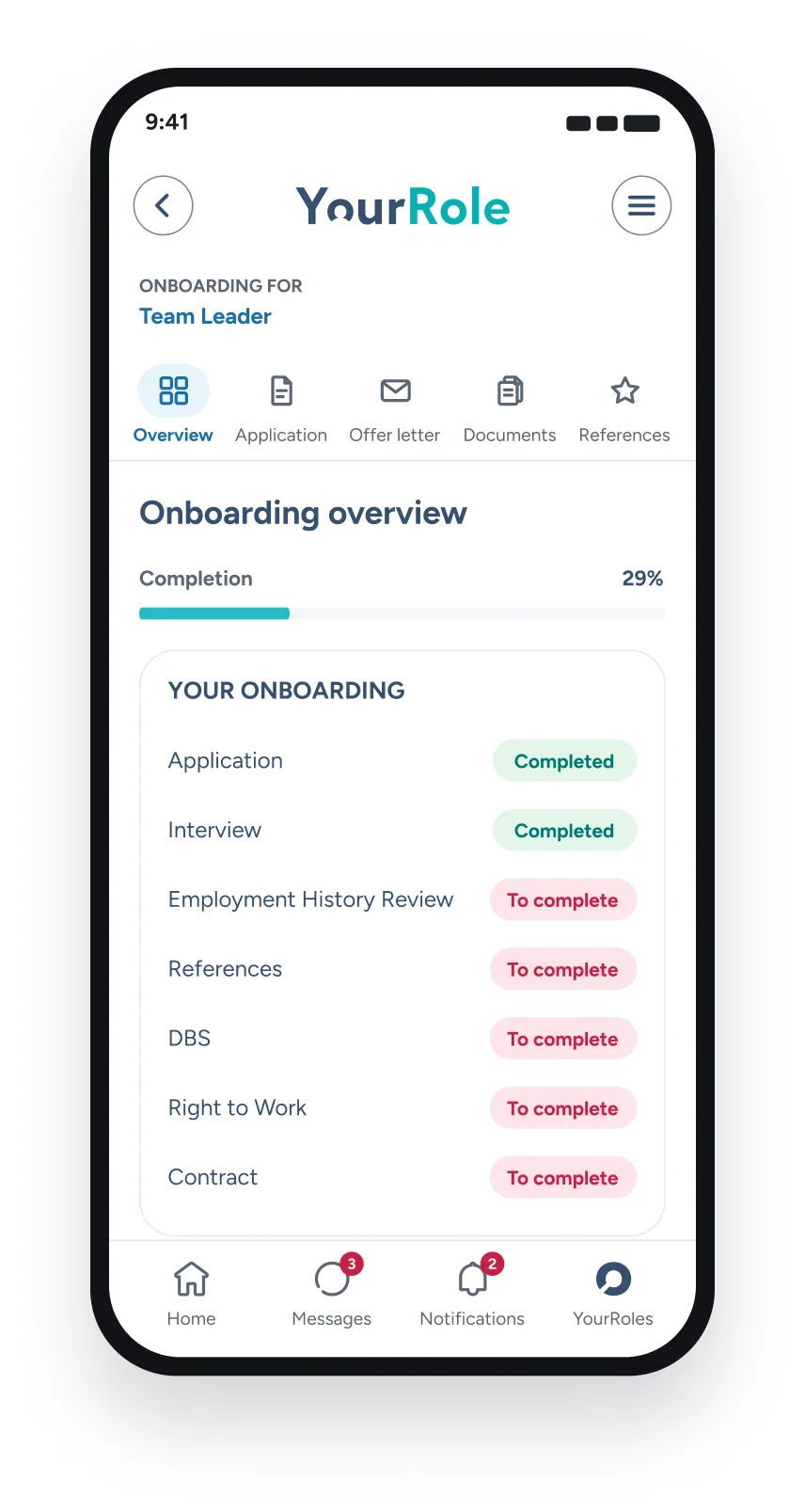
    Candidate Receives Their Onboarding Journey

    Instead of sending candidates multiple unrelated emails, their actions can be organised within one onboarding experience.

    For example:

    YourRole app on a phone showing a team leader’s onboarding overview: application and interview completed, references, DBS, Right to Work and contract still to complete

    The candidate can see what is required and what remains outstanding.

  4. 4

    Employment History Is Reviewed

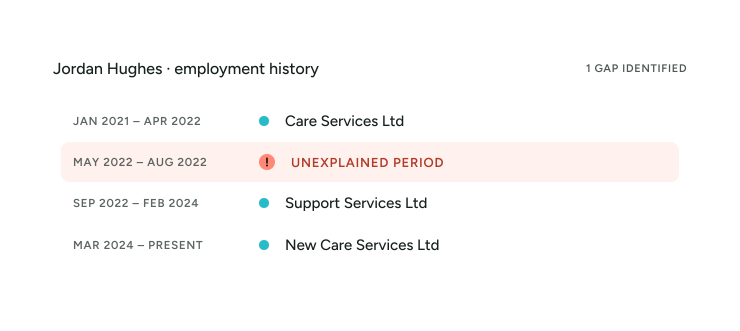
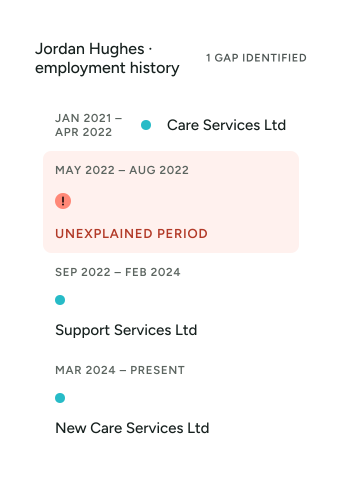
    YourClouds can help structure the candidate’s declared employment history into a chronological timeline.

    For example:

    Rather than relying entirely on somebody manually comparing dates, potential gaps can be identified for follow-up.

  5. 5

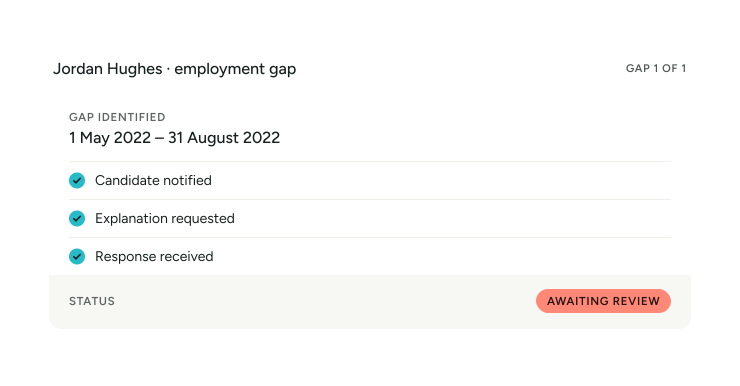
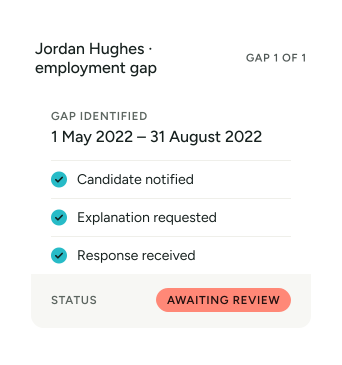
    Employment Gaps Are Progressed

    Where an unexplained period is identified, the candidate can be asked for further information.

    The objective isn’t simply to flag a gap.

    It’s to help progress it towards resolution.

  6. 6

    References Are Requested

    YourClouds can issue digital reference requests to the candidate’s referees.

    The system can record:

    • • Who was contacted
    • • When the request was sent
    • • Whether a response has been received
    • • Follow-up activity
    • • Verification activity
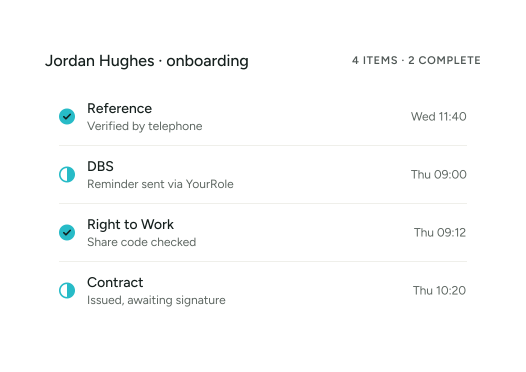
    • • Outstanding actions

    But the process doesn’t stop at:

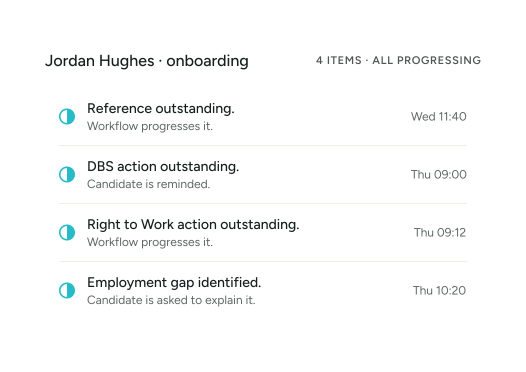
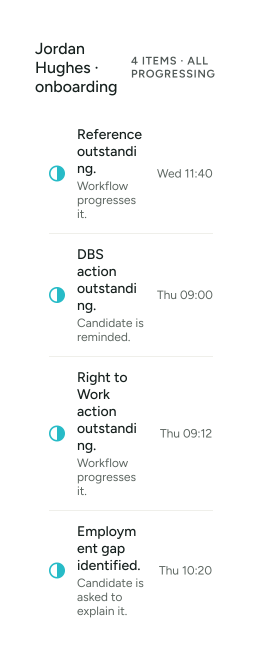
    REFERENCE OUTSTANDING

  7. 7

    References Are Chased

    Where references remain outstanding, configured workflows can help progress them.

    1. Initial Request
    2. Automated Reminder
    3. Further Follow-Up
    4. Candidate Notification
    5. Telephone Contact
    6. Escalation Where Required

    Your recruitment team doesn’t need to manually chase every routine reference.

  8. 8

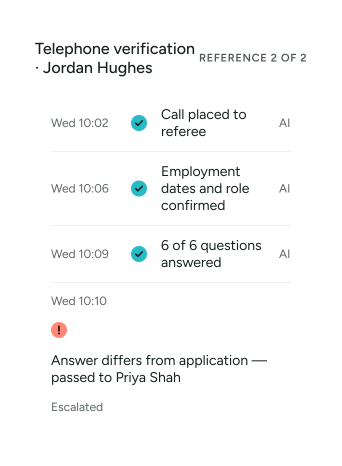
    References Can Be Telephone Verified

    Where telephone verification forms part of your configured process, YourClouds can manage it.

    Telephone verification can be undertaken using:

    AI-Powered Telephone Verification

    AI can conduct configured telephone-verification conversations and capture the relevant responses.

    Human Telephone Verification

    A person can undertake verification where appropriate.

    AI + Human Escalation

    AI can manage routine interactions and escalate cases requiring human involvement.

    This allows the verification model to be configured around the organisation and circumstances.

  9. 9

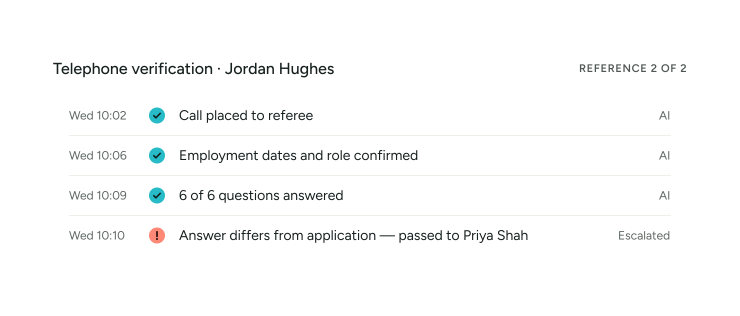
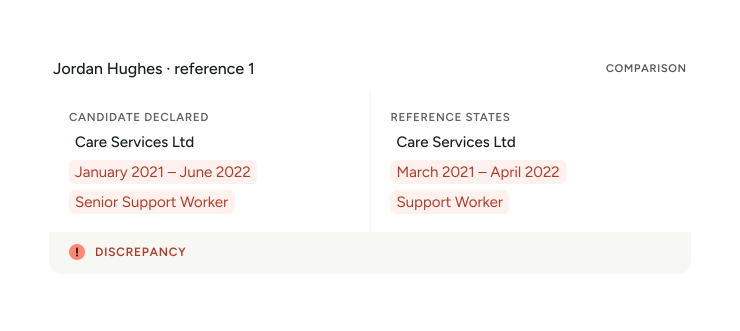
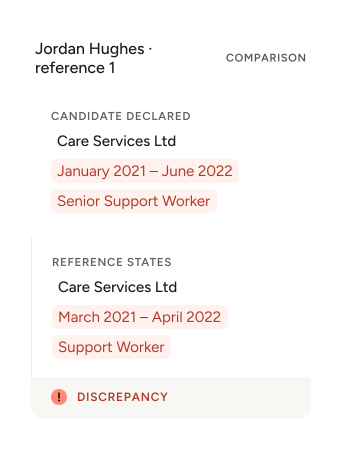
    Employment Information Is Compared

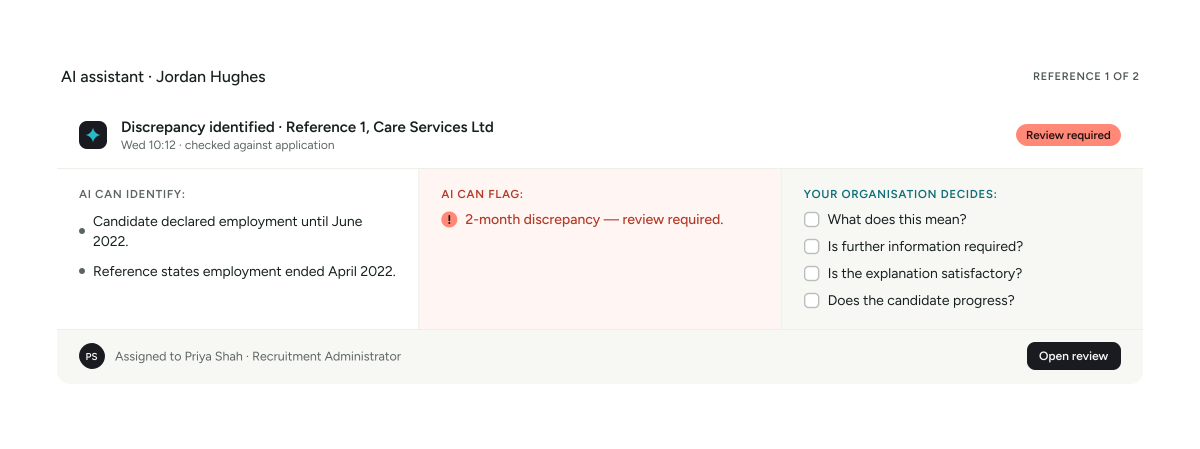
    A reference can then be compared with the information originally provided by the candidate.

    For example:

    YourClouds can help identify the difference.

    Your recruitment team reviews what it means.

  10. 10

    DBS Workflow Is Managed

    Where the role is eligible for a DBS check and the appropriate process requires one, the DBS workflow can become part of onboarding.

    Depending on the circumstances, this may include:

    • • Existing DBS information
    • • DBS Update Service workflow
    • • New DBS application workflow
    • • Candidate actions
    • • Progress monitoring
    • • Reminders
    • • Exceptions
    • • Relevant record keeping

    DBS application fees and applicable third-party charges are additional.

  11. 11

    Right to Work Is Managed

    Right to Work can be managed through the same onboarding journey.

    Depending on the candidate’s circumstances and applicable requirements, the appropriate workflow can be followed.

    • Candidate action.
    • Verification.
    • Outcome.
    • Exceptions.
    • Future follow-up where applicable.

    All connected to the candidate record.

    Applicable third-party verification fees are additional.

  12. 12

    Offer Letters & Contracts

    Offers and contracts can form part of the candidate’s digital journey.

    Documents can be:

    • • Issued
    • • Viewed
    • • Signed
    • • Witnessed where required by the configured process
    • • Recorded
    • • Connected to the candidate record

    The candidate doesn’t need a separate onboarding system just to receive their employment documents.

  13. 13

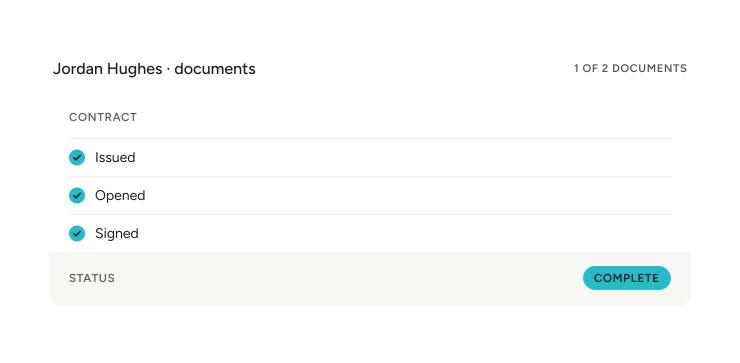
    Digital Signatures

    Candidates can complete relevant documents digitally.

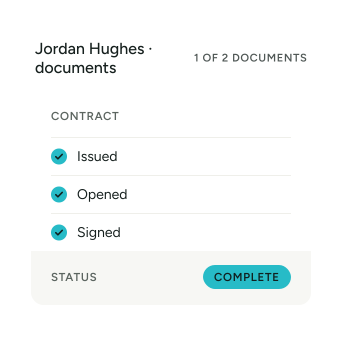
    The system can maintain appropriate records of document completion and signatures within the onboarding journey.

    For example:

  14. 14

    Candidate Communications

    Candidates inevitably have questions.

    They also forget things.

    Instead of your recruitment team manually managing every routine interaction, YourClouds can use automated and AI-assisted communications as part of the process.

    This can help with:

    • • Action notifications
    • • Reminders
    • • Outstanding information
    • • Reference information
    • • Onboarding instructions
    • • Appropriate process questions
    • • Status updates

    Where something requires human attention, it can be escalated.

03In YourClouds

AI Doesn’t Make the Hiring Decision

This is an important distinction.

YourClouds can use AI to help:

  • Communicate
  • Chase
  • Call
  • Compare
  • Identify
  • Organise
  • Summarise
  • Escalate

But AI shouldn’t independently decide whether a candidate is suitable for employment.

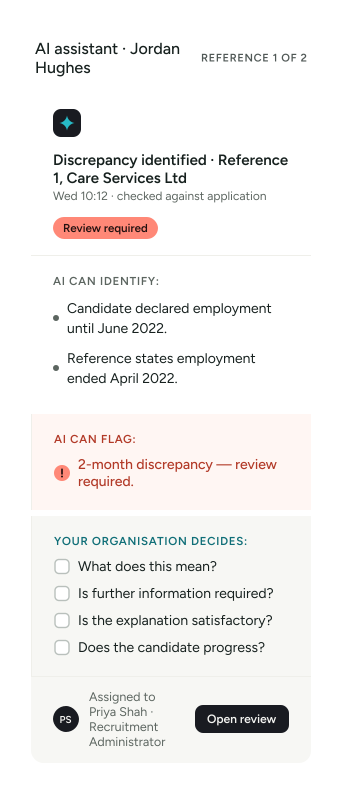
For example:

Technology does the repetitive work. People retain the judgement.

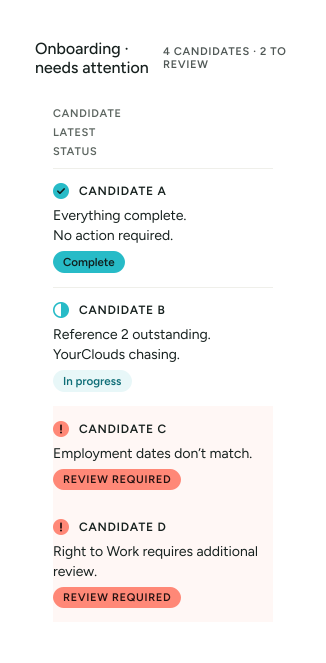
Manage by Exception

This is one of the most important principles behind YourClouds.

Your recruitment team shouldn’t need to review every routine action every day.

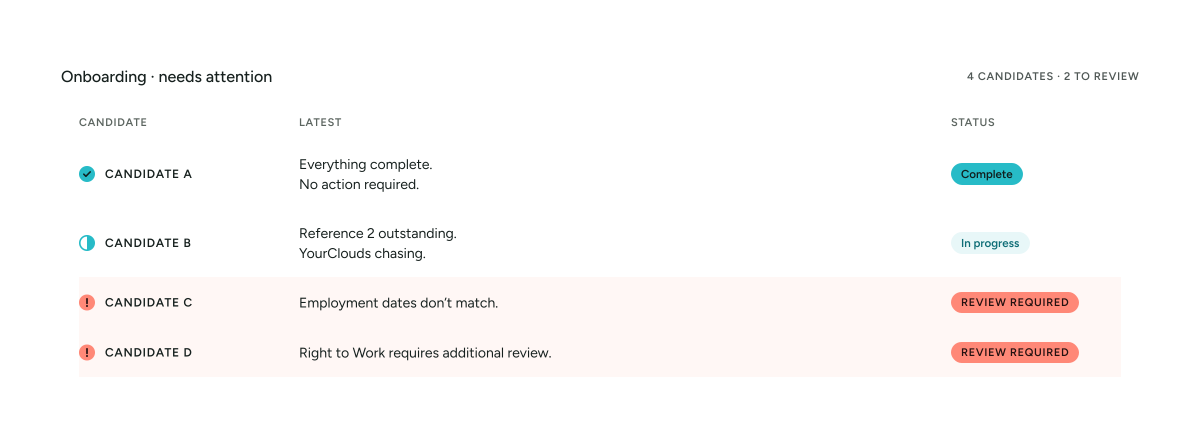
They should see:

WHAT NEEDS MY ATTENTION?

For example:

Your team concentrates on C and D. YourClouds continues progressing B.

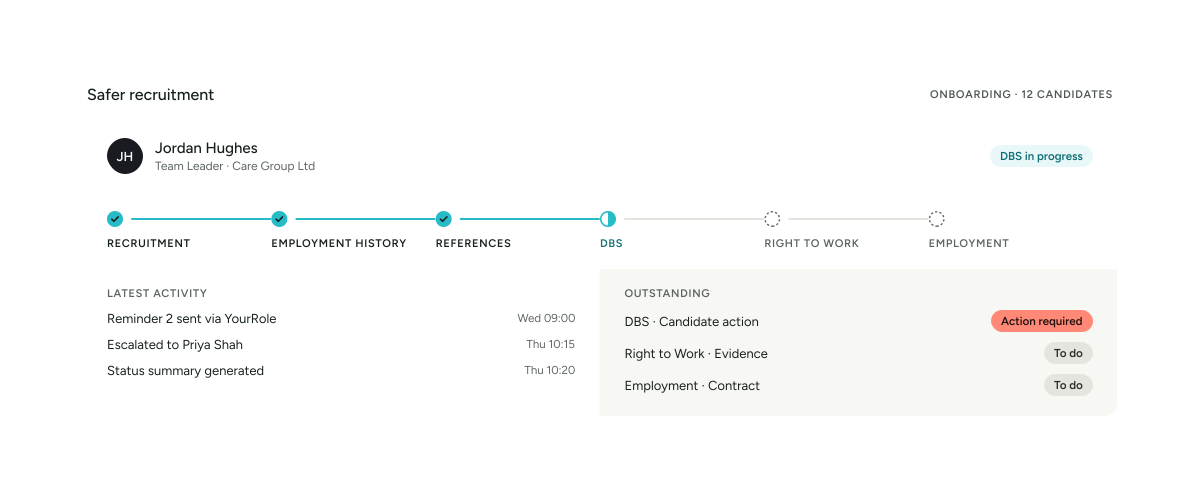
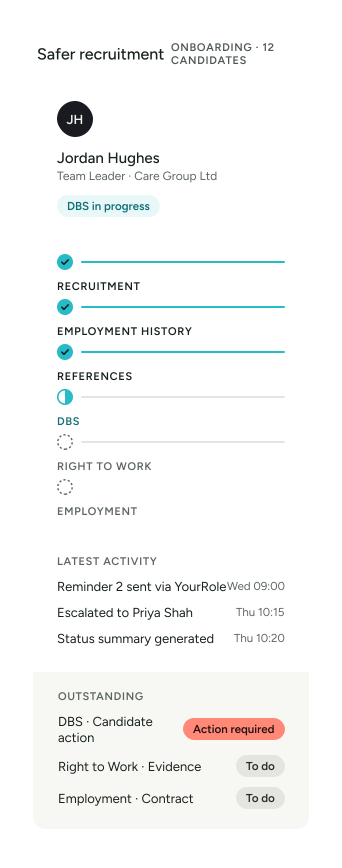
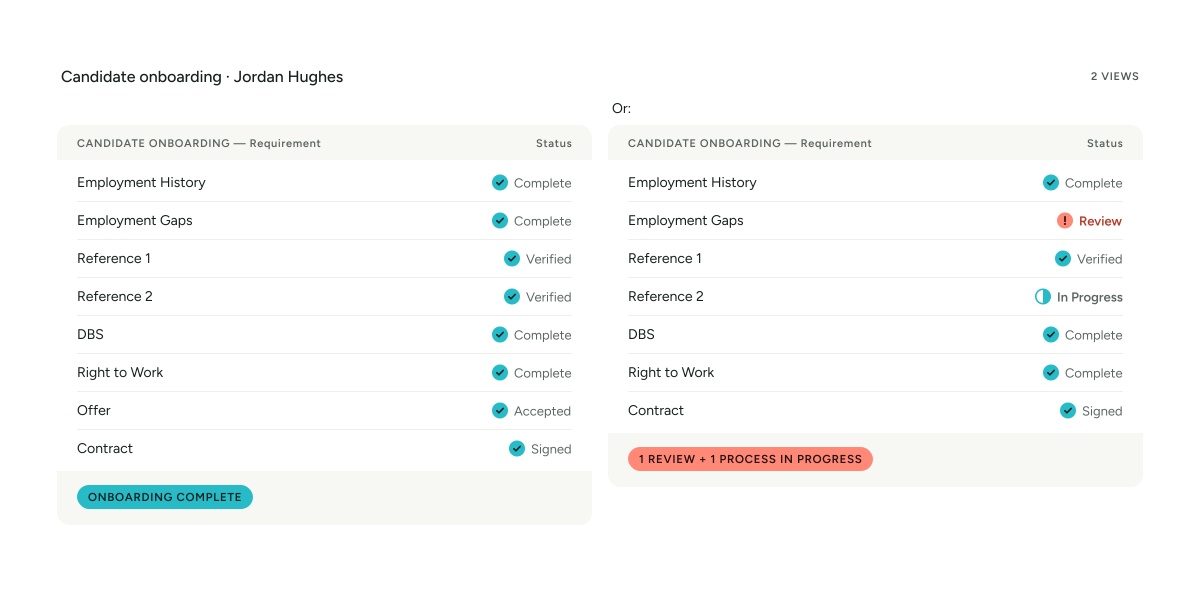
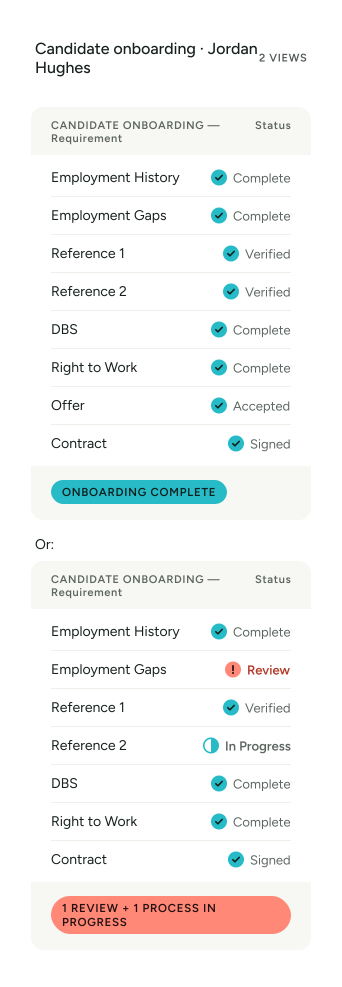
See the Entire Candidate at a Glance

That’s much more useful than simply seeing a list of documents.

Software + AI + Managed Support

The YourClouds model combines three layers.

SOFTWARE

Manages:

• Candidate records

• Workflows

• Documents

• Status

• Tasks

• Communications

• Audit trails

• Permissions

AI & AUTOMATION

Helps:

• Chase

• Communicate

• Call

• Compare

• Identify

• Summarise

• Monitor

• Escalate

MANAGED SUPPORT

Helps progress the recruitment and onboarding workflow and handles appropriate exceptions or activities requiring intervention.

Your organisation retains the recruitment decision.

YourRole

YourRole Candidate App

Candidates can manage the entire journey through YourRole.

From their phone they can:

  • • Complete recruitment actions
  • • Provide information
  • • Add employment history
  • • Provide referees
  • • Respond to gap questions
  • • Receive notifications
  • • Complete onboarding actions
  • • Review outstanding tasks
  • • Access documents
  • • Sign contracts
  • • Communicate during onboarding

A desktop candidate portal is also available.

Two YourRole app screens: DBS application stages and the candidate’s tasks and notifications

One Candidate Experience

Candidates shouldn’t feel as though they’re dealing with six different departments and systems.

Instead:

  1. Apply
  2. Interview
  3. Offer
  4. Onboard
  5. Start

The technology underneath can manage multiple workflows while the candidate experiences one journey.

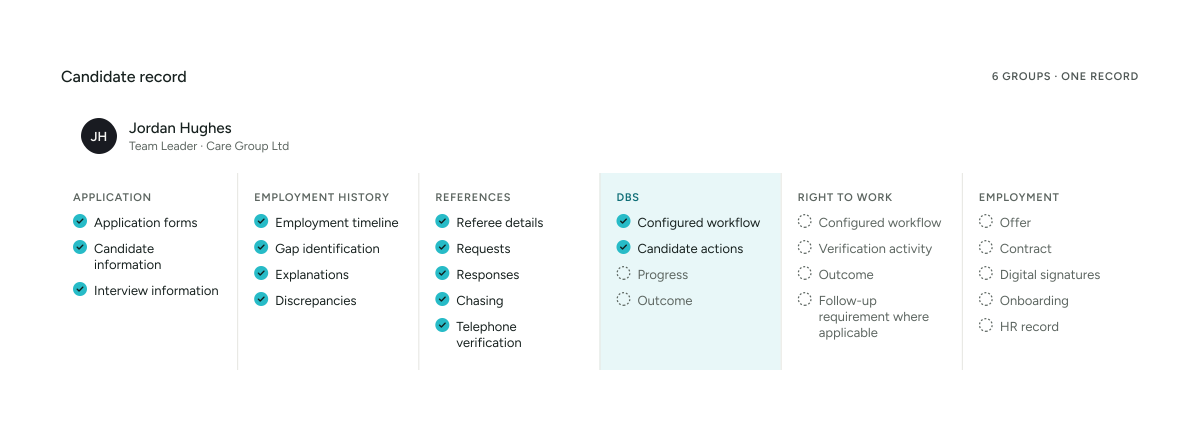
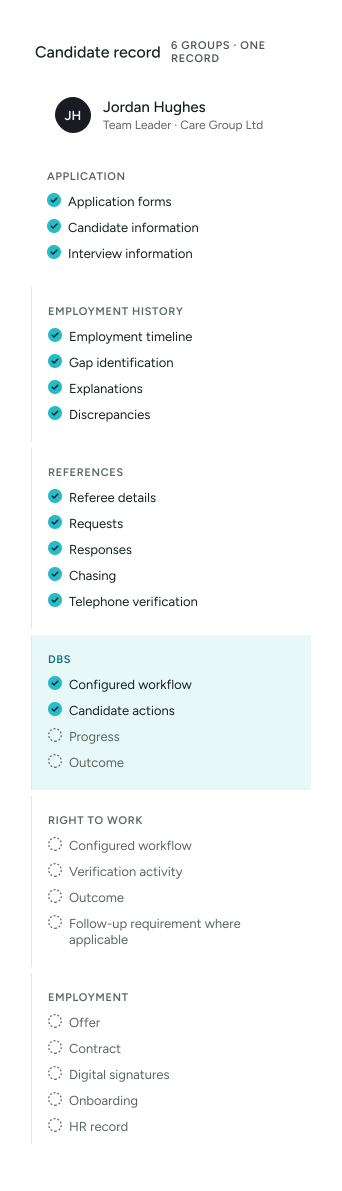
One Recruitment Record

The candidate record can bring together:

One connected record.

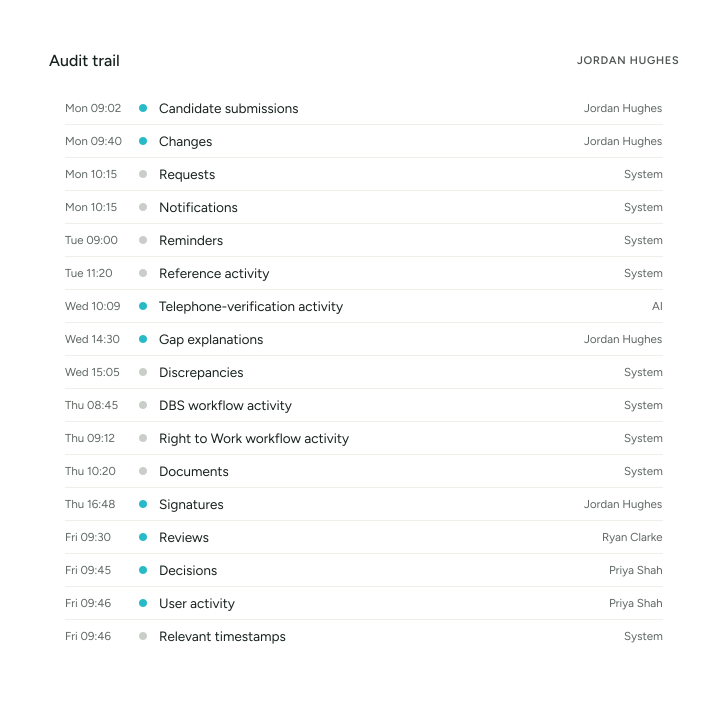
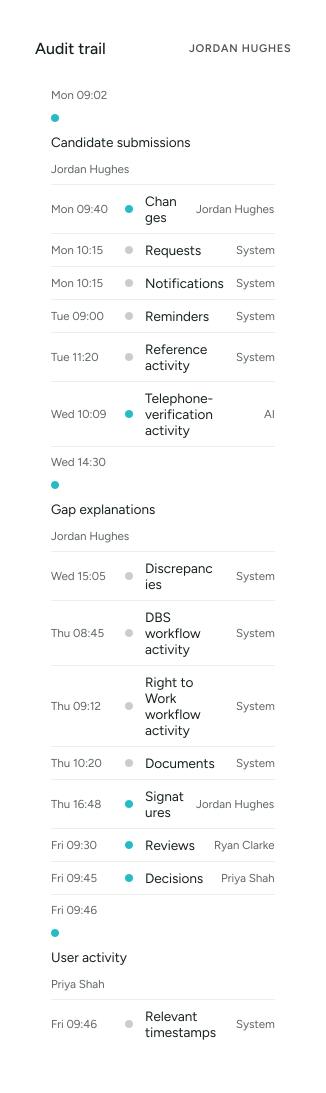
Complete Audit Trail

YourClouds can maintain relevant activity throughout the candidate journey.

Depending on the configured process, this can include:

This creates a clearer record of how the candidate progressed through recruitment.

Recruitment to HR

Onboarding shouldn’t end with another data-entry exercise.

Once a successful candidate completes onboarding, their recruitment information can form part of a connected employee journey as YourClouds HR becomes available.

This reduces the need to create an entirely new employee record manually.

  1. Candidate
  2. Onboarding
  3. Employee

The journey continues.

YourClouds HR – Coming Soon

Once a successful candidate completes onboarding, their recruitment information can form part of a connected employee journey as YourClouds HR becomes available.

This creates opportunities to continue managing:

  • Employee information
  • Employment documents
  • Policies
  • Training
  • Future checks
  • Relevant expiry dates
  • Other HR processes

Recruitment becomes the beginning of the employee lifecycle rather than a disconnected system.

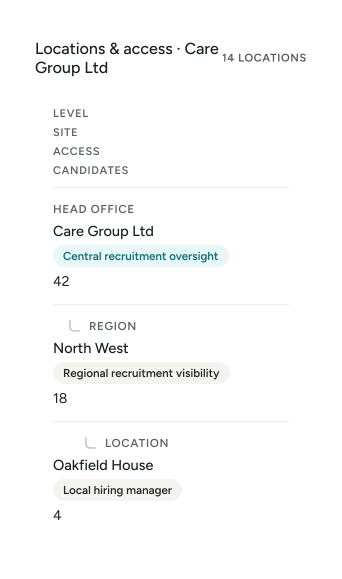
Built for Multi-Site Organisations

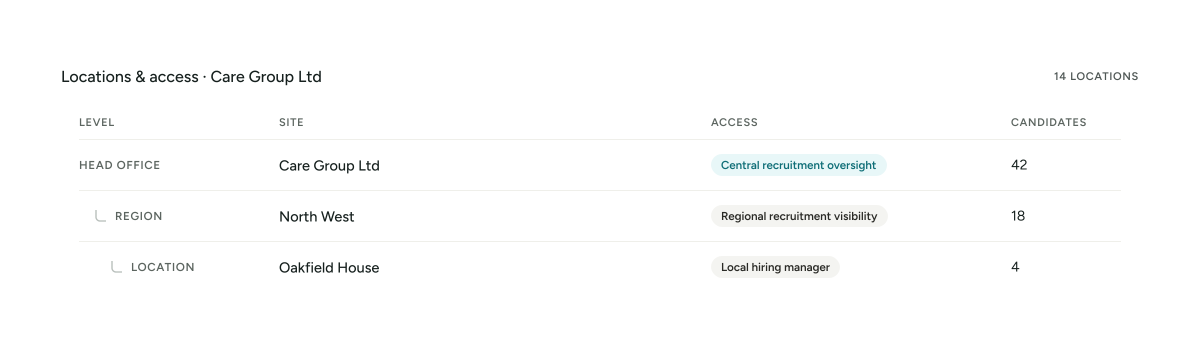
YourClouds is designed for organisations operating across multiple locations.

For example:

Different permissions can provide different users with the information they need.

Central Recruitment. Local Decisions.

A care group, academy trust, healthcare provider or children’s-home organisation might want a central recruitment team to manage onboarding.

But local managers still need appropriate visibility.

YourClouds can support both.

CENTRAL TEAM

Manages onboarding workflow.

LOCAL MANAGER

Sees appropriate candidate progress.

AUTHORISED REVIEWER

Reviews exceptions.

HR

Receives the successful candidate.

Managed Onboarding by Sector

Kitchen and dining area in a children’s home

Managed Onboarding for Children’s Homes

Children’s residential recruitment can involve significant safer-recruitment administration.

YourClouds can help manage:

  • Employment histories
  • Gap checks
  • References
  • Reference chasing
  • Telephone verification
  • DBS workflows
  • Right to Work
  • Contracts
  • Candidate communications
  • Recruitment records
Explore Safer Recruitment for Children’s Homes
Lounge with armchairs in a care home

Managed Onboarding for Adult Social Care

High-volume recruitment can place significant pressure on adult social care providers.

YourClouds can support:

  • Care homes
  • Nursing homes
  • Domiciliary care
  • Supported living
  • Learning disability services
  • Mental health services
  • Community care
  • Multi-site providers
Explore Safer Recruitment for Adult Social Care
Primary school classroom with tables and chairs

Managed Onboarding for Schools & Education

Schools, academies and Multi-Academy Trusts can use YourClouds to create more consistent recruitment and onboarding processes.

Central teams can maintain oversight while individual schools retain appropriate recruitment control.

Explore Safer Recruitment for Schools & Education
Clinical treatment room with an examination couch

Managed Onboarding for Healthcare

Healthcare organisations can manage onboarding across clinical, care, support, management and operational positions.

The platform can support high candidate volumes across multiple services and locations.

Explore Safer Recruitment for Healthcare

04Pricing

What Does £199 + VAT Replace?

The comparison isn’t:

£199 + VAT versus £0

Because onboarding already costs you money.

The real comparison is:

Your Current Process

  • Recruitment software
  • HR administration
  • Reference chasing
  • Telephone calls
  • Employment-history checking
  • Gap checking
  • DBS administration
  • Right to Work administration
  • Candidate chasing
  • Contract administration
  • Manager time
  • Recruitment team time

Versus

YourClouds Managed Onboarding

£199 + VAT

per candidate entering onboarding

Plus applicable DBS, Right to Work verification and other third-party charges.

Calculate the Internal Cost

Consider one candidate.

How much time does your team spend:

  • Reviewing their employment history?
  • Identifying gaps?
  • Contacting them?
  • Chasing references?
  • Calling referees?
  • Verifying information?
  • Managing DBS?
  • Managing Right to Work?
  • Answering candidate questions?
  • Sending reminders?
  • Preparing contracts?
  • Chasing signatures?
  • Updating hiring managers?
  • Recording everything?

Now multiply that by:

  • 10 candidates per month.
  • 50 candidates per month.
  • 100 candidates per month.
  • 500 candidates per month.

The administrative cost can become significant.

Simple, Transparent Pricing

£199 + VATPer candidate entering managed onboarding

You don’t pay £199 + VAT for every person who sees your advert.

You don’t pay £199 + VAT for every application.

You don’t pay £199 + VAT for every interview.

The managed onboarding fee becomes payable when:

You decide to progress the candidate into managed onboarding.

What If the Candidate Doesn’t Start?

Once a candidate enters managed onboarding, the £199 + VAT service fee becomes payable.

That remains the case if the candidate subsequently:

  • Withdraws
  • Fails to complete onboarding
  • Doesn’t satisfy your organisation’s recruitment requirements
  • Has information requiring review
  • Doesn’t ultimately start employment

This is because the managed onboarding work has already begun.

Additional Charges

The £199 + VAT fee covers the managed onboarding service.

It doesn’t include third-party charges such as:

  • DBS application fees
  • Right to Work verification fees
  • Other external verification charges where applicable

These are charged separately where required.

No Need to Pay £199 + VAT Before You’ve Chosen the Candidate

This is important commercially.

YourClouds can support the earlier recruitment journey through:

  1. Job advertising
  2. Applications
  3. Candidate management
  4. Interviews
  5. Interview scheduling
  6. Video interviews
  7. Selection

The managed onboarding charge is triggered when you decide:

“We want to progress this person into onboarding.”

That’s when the £199 + VAT managed service begins.

A Better Way to Scale Recruitment

Recruiting five people is manageable manually.

Recruiting fifty becomes harder.

Recruiting hundreds across multiple locations creates a different problem entirely.

Adding more candidates usually means adding more administration.

YourClouds is designed to change that relationship.

More recruitment shouldn’t automatically mean proportionally more administration.

Software, automation and AI can handle much of the repetitive workload while your team concentrates on decisions and exceptions.

Stop Paying Managers to Chase Paperwork

Your highest-value people shouldn’t spend their day asking:

  • “Have you completed your DBS?”
  • “Can you send your Right to Work information?”
  • “Can you explain this employment gap?”
  • “Can you give me another referee?”
  • “Has your previous employer replied?”
  • “Can you sign your contract?”

That’s administrative work.

Let technology help do the chasing. Let your people make the decisions.

From Recording System to Doing System

This is the fundamental difference we want YourClouds to deliver.

Traditional Recruitment Software

Candidate Records

  • File
  • Edit
  • View
  • Records
  • Help
  • Reference outstanding. Your team acts.
  • DBS outstanding. Your team acts.
  • Right to Work outstanding. Your team acts.
  • Gap explanation outstanding. Your team acts.

YourClouds

Your team gets involved when:

JUDGEMENT IS REQUIRED.

Why Choose YourClouds Managed Onboarding?

  • £199 + VAT Per Candidate

    Simple managed-service pricing from the point the candidate enters onboarding.

  • Software + AI + Managed Support

    More than a recruitment database.

  • Reference Chasing

    Help progress outstanding references.

  • Telephone Verification

    AI, human or combined verification depending on the configured process.

  • Employment History Checking

    Structure and review the candidate’s employment timeline.

  • Employment Gap Checking

    Identify unexplained periods and obtain further information.

  • DBS Management

    Manage the DBS workflow alongside the rest of onboarding.

  • Right to Work Management

    Connect Right to Work with the candidate’s wider recruitment record.

  • Candidate Communications

    Help reduce manual emails and chasing.

  • Contracts

    Issue and manage employment documentation.

  • YourRole App

    Give candidates one place to manage their journey.

  • Exception Management

    Direct recruitment teams towards cases requiring judgement.

  • Audit Trail

    Maintain a clearer record of what happened.

  • HR Integration – Coming Soon

    Once a successful candidate completes onboarding, their recruitment information can form part of a connected employee journey as YourClouds HR becomes available.

05Questions

Frequently Asked Questions

What is managed candidate onboarding?

Managed candidate onboarding means YourClouds combines its recruitment technology, automation, AI and managed support to help progress selected candidates through configured pre-employment processes.

How much does YourClouds managed onboarding cost?

The managed onboarding service costs:

£199 + VAT per candidate entering onboarding.

DBS application fees, Right to Work verification fees and other applicable third-party charges are additional.

Do we pay £199 + VAT for every applicant?

No.

The £199 + VAT managed onboarding fee isn’t charged for every applicant simply because they apply.

It becomes payable when your organisation decides to progress a candidate into managed onboarding.

Do we pay £199 + VAT for every person we interview?

No.

Interviewing somebody doesn’t itself trigger the managed onboarding fee.

What if the candidate withdraws during onboarding?

Once the candidate has entered managed onboarding, the £199 + VAT fee remains payable because the managed service has begun.

What if the candidate fails a check?

The £199 + VAT fee remains payable once managed onboarding has started.

Your organisation determines whether information obtained during recruitment is satisfactory and whether the candidate progresses.

Is the DBS fee included?

No.

DBS application fees and applicable third-party charges are additional.

Is Right to Work verification included?

Management of the Right to Work workflow can form part of the £199 + VAT managed onboarding service.

Applicable third-party verification charges are additional.

Are references included?

Reference requests, configured chasing and telephone-verification workflows can form part of managed onboarding.

Is telephone verification always carried out by a person?

No.

Depending on the configured workflow and circumstances, telephone verification can use AI-powered calling, human verification or a combination of both.

Does AI decide whether somebody should be employed?

No.

AI can help progress administrative work, analyse information and identify potential exceptions.

The recruiting organisation remains responsible for recruitment decisions.

Can YourClouds identify employment gaps?

YourClouds can help structure candidate employment histories and identify periods requiring further information.

Can YourClouds compare references with application information?

Yes.

Information obtained during reference checking can be compared with information declared by the candidate to help identify potential discrepancies.

Can candidates use an app?

Yes.

Candidates can use the YourRole app or desktop candidate portal to manage their recruitment and onboarding journey.

Can we customise our onboarding process?

Yes.

Workflows can be configured around different organisations, roles, services and recruitment requirements.

Can different roles have different onboarding requirements?

Yes.

For example, different roles can require different:

Application stages · Interview stages · Reference requirements · DBS workflows · Verification steps · Documents · Approvals · Onboarding actions

Does YourClouds support multiple locations?

Yes.

YourClouds is designed for multi-location organisations with configurable roles and permissions.

What happens when onboarding is complete?

Once a successful candidate completes onboarding, their recruitment information can form part of a connected employee journey as YourClouds HR becomes available.

You Recruit Them. We Help Onboard Them.

You choose who you want.

YourClouds helps manage the work that follows.

  • Employment History
  • Employment Gaps
  • References
  • Telephone Verification
  • DBS Workflow
  • Right to Work
  • Contracts
  • Candidate Communications
  • Recruitment Record

£199 + VAT per candidate entering onboarding

DBS application fees, Right to Work verification fees and other applicable third-party charges are additional. Recruitment requirements vary according to the organisation, sector, role and applicable legislation and guidance. YourClouds supports and manages configured recruitment workflows; recruitment and employment decisions remain with the recruiting organisation.